Magazines
Weekly and monthly titles in print and digital, with editors, designers and photo desks working on the same issue at once.

A multi-channel content creation system built for teams working in Adobe InDesign and beyond.
Long documents, produced on a schedule, by teams who cannot afford a version to go missing.
Weekly and monthly titles in print and digital, with editors, designers and photo desks working on the same issue at once.
Daily deadlines and high page counts, with one place to see what is written, placed, approved and sent.
Long-form titles with chapters, editions and reprints, where text and layout stay in step from first draft to press.
Annual, sustainability, ESG and integrated reports, where sign-off and an audit trail matter as much as the design.
Seasonal brochures built from product data, so names, specifications and prices stay correct across every edition.
Hundreds of pages laid out from a single data source and republished without retyping a line.
Also manuals, journals, membership magazines and programme guides, anything that runs long, repeats every issue and passes through several hands.
Designers and editors keep the tools they know. Studio sits behind them and does the filing.
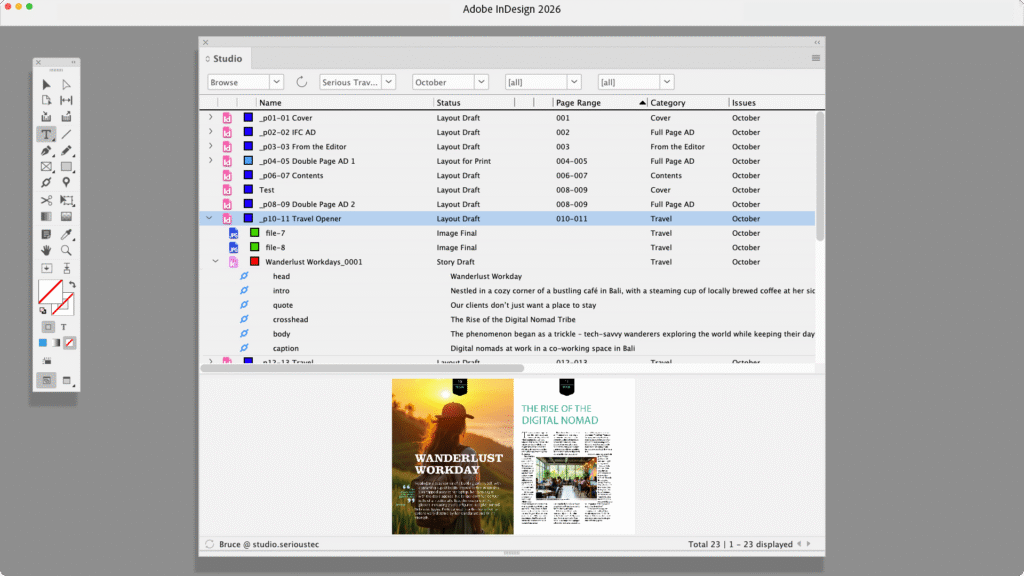
Search, browse, open and save layouts from a panel in InDesign. The images and text you would normally place are in the same panel, so nothing has to be downloaded, copied into a project folder or named by hand.
Anyone who has tried to adopt InCopy on its own knows the confusion: assignment files, packages and folders to keep straight. Studio removes all of it. Save an article and an editor can open it in InCopy straight away, while the designer keeps working on the page.
10 features in WoodWing Studio you’ll appreciate from day one.

Plan and manage all your content from a single overview, giving your team clear visibility into upcoming publications, deadlines, and priorities.
Define and automate every step of your editorial process, from ideation to publication, ensuring consistency and efficiency across teams.
Create content once and seamlessly publish it across print, web, mobile, and social channels without duplicating effort.
Enable writers, editors, and designers to work together simultaneously within the same environment, reducing bottlenecks and miscommunication.
Track every change made to your content with full version history, allowing teams to compare edits and revert when needed.
Assign tasks, set deadlines, and track progress across your editorial team to ensure accountability and timely delivery.
Connect your editorial workflow directly with Adobe InDesign to streamline the creation of print-ready layouts.
Use structured content and metadata to make your content reusable, searchable, and ready for multi-channel distribution.
Standardize review and approval processes with clear roles and statuses, ensuring content is validated before publication.
Store and organize published content in a central archive, making it easy to find, reuse, and repurpose valuable assets.
We are an authorized partner for the following leading platforms. We help you implement, integrate, and maximize the value of these tools.
WoodWing Studio Cloud is the fully managed, cloud-hosted version of WoodWing Studio, running on AWS infrastructure. WoodWing takes care of everything so your IT team can focus on other priorities.
WoodWing Studio can also be installed on your own infrastructure, whether on-premise or in a private cloud. This model gives your organisation full control over the environment and is suited to organisations with specific data sovereignty or compliance requirements.
Are you curious to see if WoodWing Studio is a right fit for you? We'll assist you at every step.
For the on-premise version

WoodWing supports customers in managing content, assets, knowledge, and enterprise information with solutions that cover creation, collaboration, compliance, and quality assurance.


